AI Spend Governance for WordPress
Per-plugin budgets, alerts, and audit visibility for WordPress AI activity.
WordPress 7.0 ships native AI. One API key powers every plugin — and there are no per-plugin spend caps in core. AI Spend Governance for WordPress adds the budget layer that stops a misconfigured chatbot or runaway loop from blowing up your monthly bill.
Discounted first year. 30-day beta refund.
Your first year is $39/yr; renewal moves to $79/yr unless cancelled before renewal. If you buy during the beta and are not happy within 30 days, email support from the order address and we will process a full refund through the original payment method where possible.
- Founder Early Beta discount. The launch price applies to the first subscription year; renewals use the regular annual price shown before checkout unless cancelled first.
- 30 days for beta purchases. Standard non-beta purchases use the regular 14-day first-purchase review window.
- Cancel renewal anytime. Use the Stripe billing link where available, or contact support from the order email.
One key. Twenty plugins. Zero spend caps.
WordPress 7.0's native AI client makes adding AI to a site easy — one provider key in core, every plugin shares it. That's the upside. The downside: nothing in WordPress core enforces a per-plugin budget. A single misconfigured chatbot can run up four-figure monthly bills before anyone notices.
Most site owners only see AI cost at month-end on their provider invoice. By then the damage is done. AI Spend Governance for WordPress moves the spending controls into WordPress itself: hard caps per plugin, alerts at thresholds, and a kill switch when something goes wrong.
Six controls. One screen.
Per-plugin spend caps
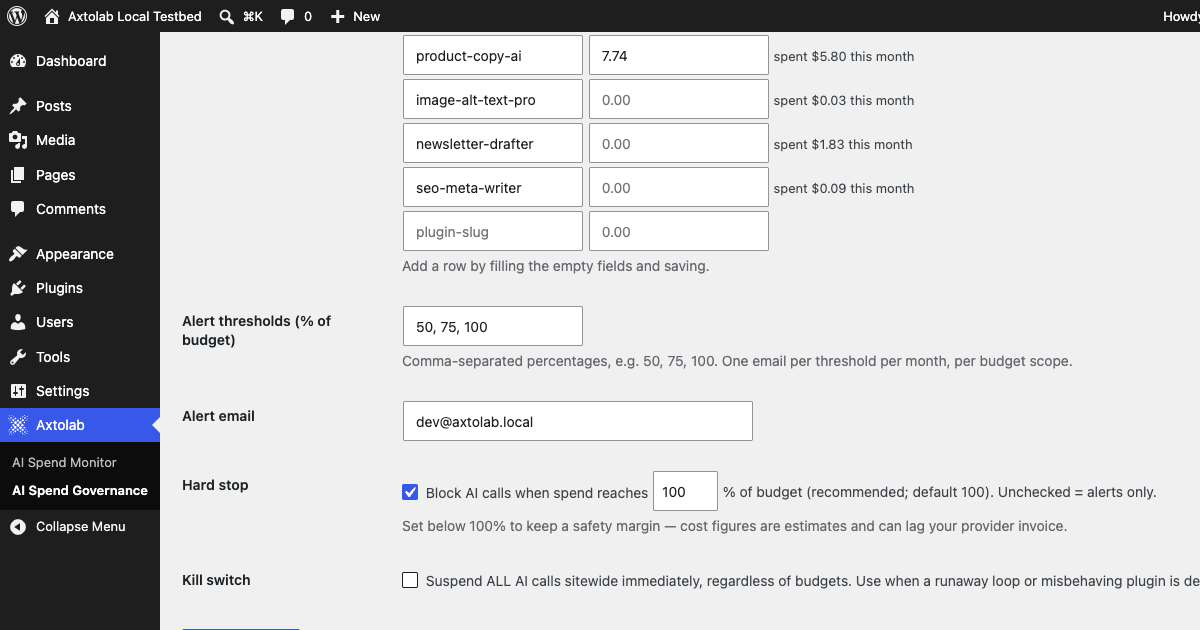
Set a monthly dollar limit on every AI-using plugin individually. The hard stop triggers at a percentage you choose (default 100%) — the blocked plugin gets a clean WordPress error and hides its AI features; your pages keep loading and your provider is never charged.
Multi-threshold alerts
Get an email when any budget crosses 50%, 75%, and 100% (thresholds are configurable), and again when calls start being blocked. Catch surprise spend the same day, not at month-end.
Spend-by-plugin dashboard
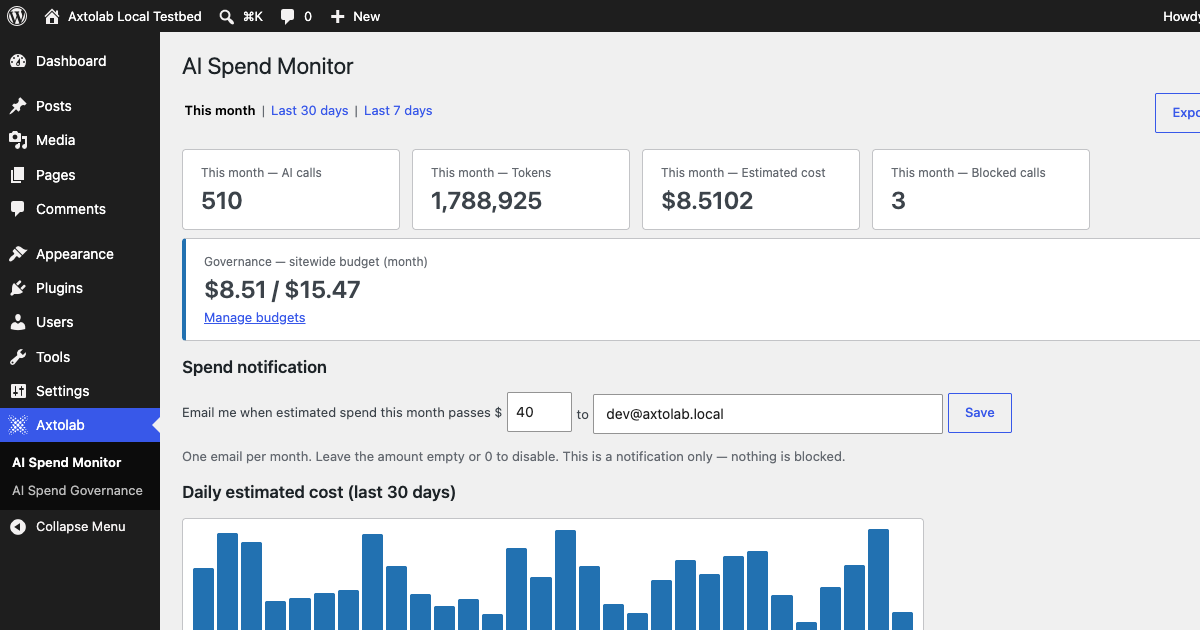
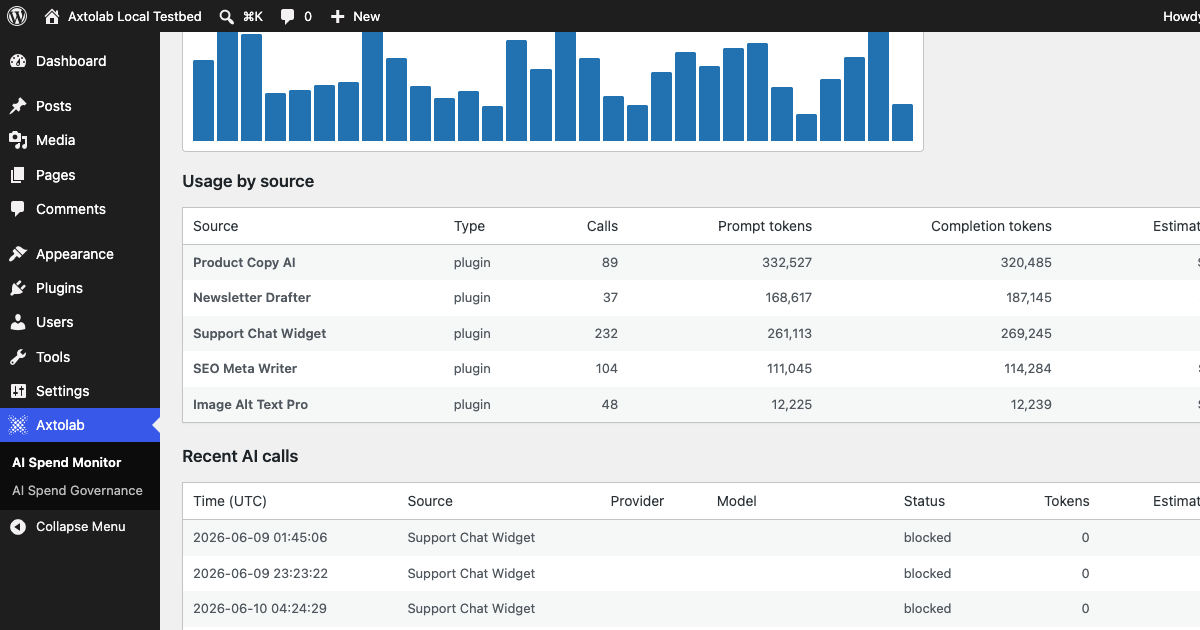
Powered by the free AI Spend Monitor: see which plugins use your AI key, how often, and what it costs. WordPress 7.0's log shows the call; this shows the bill.
Per-model cost rates
Cost estimates use a bundled list-price table for popular OpenAI, Anthropic, and Google models — adjustable to your contracted rates via a developer filter.
Blocked-call log + CSV export
Every call stopped by a budget is recorded with the plugin that triggered it, and the full call log — including blocked calls — exports to CSV for finance via the bundled free Monitor.
Sitewide kill switch
Suspend all AI calls sitewide with one checkbox. Useful when a runaway loop is detected or a misconfigured plugin starts hammering the API.
The questions a careful buyer asks, answered here.
You're putting a blocking layer on a live site. Here is exactly how it behaves at the edges.
When a call is blocked
The plugin making the call receives a standard WordPress error, and AI-feature checks report "unavailable" — well-built plugins hide their AI buttons or fall back to their no-AI state. And even a badly-built plugin cannot spend: the block happens inside WordPress's AI pipeline before any request leaves your site, so its worst case is an unpolished error message — never a charge. Verified call-for-call against a live provider: blocked calls never appear in the provider log.
If our license server is unreachable
Enforcement keeps working. License checks fail open on network errors by design — an outage on our side can never disable your budgets or your kill switch.
If you cancel
Blocking and alerts stop at the end of your term. The free Monitor, your dashboard, and your full usage history remain — nothing is held hostage.
Pricing, plainly
Founder Early Beta: $39 first year, renews at the regular $79/yr — shown again before checkout, cancel anytime, 30-day full refund. One license covers one site. Running several? The Pro Bundle (all five paid add-ons) is $99/yr first year for one site or $199/yr for five sites, renewing at $249/$499.
Not sure your plugins are covered?
Install the free AI Spend Monitor first — it costs nothing and answers this in 60 seconds. Any plugin that appears in the Monitor's dashboard is a plugin Governance can budget and block. Same data layer, same coverage, zero guesswork before you pay.
Version
v0.2.0, tested against WordPress 7.0 with a live provider (real checkout-to-enforcement run captured in QA). Requires the free AI Spend Monitor as its data layer.
What we cover. What we don't.
Budget controls only work where AI activity flows through hooks we can intercept. We don't pretend to police every external SaaS, custom integration, or API call that bypasses WordPress.
AI calls flowing through wp_ai_client_prevent_prompt and the WordPress 7.0 native AI client
Any plugin or theme using the native AI Client — including ones that don't exist yet, with zero integration work
Usage recorded by the free AI Spend Monitor plugin — the required data layer, free on the WordPress.org plugin directory
External SaaS tools that call providers directly without using your WP install
Custom scripts using their own API keys outside the WP AI client
Direct shell-level provider calls bypassing WordPress
Stop reading invoices. Start setting limits.
Install the free AI Spend Monitor, then add AI Spend Governance during Founder Early Beta. First year $39/yr; regular renewal $79/yr unless cancelled.